This is not a sponsored post for Asana – it’s simply a tool that we’ve loved and brought into most, if not all, of our fractional roles where the client didn’t already have a tool in place. All images throughout this post are Asana’s and do not come from any of our client projects.
When I joined one of my client’s teams, the marketing team was drowning. Not because they weren’t talented—they absolutely were—but because they were managing dozens of simultaneous projects across email threads, Slack messages, shared drives, and institutional memory that lived exclusively in people’s heads.
Sound familiar?
There was no project intake system. No centralized view of who was working on what. No way to see when deadlines were colliding or capacity was maxed out. Every request came in differently: a hallway conversation, a Slack DM, an email chain that started three weeks ago and suddenly needed action yesterday.
The team was constantly firefighting, working reactively, and burning out trying to keep track of it all.
Then we implemented Asana. And everything changed.
Not overnight—let’s be realistic—but systematically, sustainably, and in ways that fundamentally transformed how the team operated. Here’s what we learned about using Asana specifically for marketing teams in mission-driven organizations where resources are tight, demands are high, and saying no isn’t always an option.

Why Marketing Teams Need Project Management Tools (Even When They Think They Don’t)
Before we dive into the how, let’s address the why. I’ve heard every excuse:
- “We’re too small to need a PM tool”
- “We already use email/Slack/shared drives”
- “Project management software is for big corporate teams”
- “We don’t have time to learn a new system”
Here’s the truth: if you’re managing more than three projects at once, you need a system. And marketing teams—especially in mission-driven organizations—are rarely managing just three projects.
For this client, on any given day, their marketing team was juggling:
- Multi-phase campaigns
- Partnership activations for multiple corporate sponsors
- Fundraising campaign content and execution
- Social media management across platforms
- Website updates and maintenance
- Event marketing and planning
- Internal communications support
- Government relations campaigns
- Foundation marketing collaboration
Without Asana, this would have been impossible to manage effectively. With Asana, it became visible, trackable, and—crucially—sustainable.
What Changed When We Implemented Asana
1. We Could Actually See What We Were Working On
Before Asana, our team lead meetings involved people verbally listing what they were working on while someone frantically took notes. Projects lived in individual heads or scattered Slack threads. There was no single source of truth.
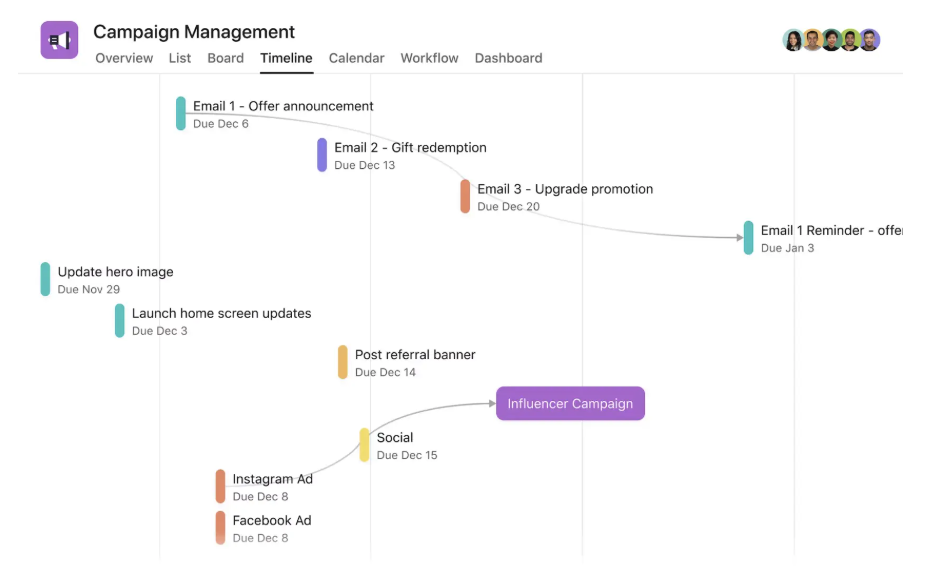
With Asana, we created a Marketing Calendar project with Timeline view that showed every active campaign, deadline, and deliverable in one place. Suddenly, everyone could see:
- What was in flight across the entire team
- Who was working on what
- When deadlines were clustering (and adjust accordingly)
- What was coming up in the next 2-4 weeks
- Where bottlenecks were forming
The impact: No more surprise deadline collisions. No more “I didn’t know you were also working on that.” No more asking the same status questions in three different Slack threads.
2. We Standardized Project Intake (And Protected Our Capacity)
This was the game-changer. We created a New Project Request Form in Asana that required anyone requesting marketing support to provide:
- Project objective and desired outcome
- Target audience
- Timeline and deadline
- Deliverables needed
- Budget (if applicable)
- Strategic alignment (which organizational goal does this support?)
- Success metrics
Every request—regardless of where it came from across the org—went through the same intake process. No more “quick favour” requests that turned into week-long projects. No more scope creep because expectations weren’t defined upfront.
The impact: We could triage requests based on strategic alignment, capacity, and deadline feasibility. We could show leadership why we couldn’t take on every request without additional resources. We could say “yes, but not until Q3” with data to back it up.
3. We Built Repeatable Templates for Recurring Work
Marketing teams do a lot of the same types of projects repeatedly: social media campaigns, partnership activations, athlete content series, event promotions. Every time we started one from scratch, we wasted time figuring out the steps and missing critical details.
We built Asana project templates for our most common project types:
Partnership Activation Template included:
- Initial kickoff with partner
- Creative brief development
- Athlete identification and outreach
- Contract and rights management
- Content production phases
- Internal approval workflows
- Partner approval workflows
- Distribution planning
- Launch coordination
- Post-campaign reporting
Brand Campaign Template included:
- Strategic planning and positioning
- Creative concepting
- Production planning (agency coordination, athlete scheduling, location scouting)
- Content creation phases
- Stakeholder review cycles
- Media partnership coordination
- Launch rollout (paid, owned, earned)
- Measurement and analysis
Each template had pre-built tasks, dependencies, approval stages, and timeline estimates. When a new project came in, we’d duplicate the template, customize for specifics, and immediately have a comprehensive project plan.
The impact: Faster project startup, fewer missed steps, consistent quality, and easier onboarding of new team members or freelancers.
4. We Made Approvals Visible (And Held People Accountable)
One of our biggest time-wasters was chasing approvals. Assets would sit in someone’s inbox for days while designers waited to move forward. We’d have to send follow-up Slack messages, emails, and hallway reminders.
In Asana, we created clear approval workflows using:
- Subtasks for each approval stage (athlete review, internal brand review, partner review, legal review)
- Assigned to specific approvers with due dates
- Dependencies that blocked subsequent work until approval was complete
- Comments for feedback directly on the task
Suddenly, approvals became visible. Leadership could see when their review was holding up a campaign launch. Partners could see where their feedback was needed. No more “I didn’t know you were waiting on me.”
The impact: Approval turnaround time dropped dramatically. Projects stopped stalling in invisible handoff points. Accountability was built into the system.
5. We Could Actually Manage Capacity (Not Just Workload)
This was critical for a small team with expanding scope. Asana’s Workload view showed us who was overallocated and who had capacity—not based on gut feeling, but based on actual task assignments and time estimates.
When new requests came in, we could look at Workload and say: “Team member A is at 120% capacity for the next three weeks due to a major campaign launch. This project either needs to wait until November or go to someone else.”
We also used Custom Fields to tag projects by:
- Strategic priority (Tier 1: Major campaigns / Tier 2: Partnership deliverables / Tier 3: Nice-to-have)
- Department requesting (so we could track scope creep from other teams)
- Project type (campaign, partnership, content, event, internal)
The impact: We could make data-informed decisions about what to take on, what to delay, and what to decline. We could show leadership the real cost of adding “just one more thing” to the team’s plate.
How We Actually Implemented Asana (Without Overwhelming the Team)
Here’s the thing about implementing new tools: if you try to do everything at once, people get overwhelmed and revert to old habits. We took a phased approach:
Phase 1: Marketing Calendar Only (Month 1)
We started simple. One project: Marketing Calendar. Every active campaign or major deliverable became a task with a due date. We used Timeline view to visualize what was coming.
That’s it. No complicated workflows, no templates, no custom fields yet. Just: can we see everything in one place?
Success metric: 100% of team members checking Asana at least once daily.
Phase 2: Project Intake Form (Month 2)
Once the team was comfortable with Asana, we introduced the New Project Request Form. We communicated it organization-wide: “All marketing requests must come through this form.”
We connected the form to our Marketing Calendar project so new requests automatically became tasks for us to review and triage.
Success metric: 75% of new requests coming through the form (old habits die hard).
Phase 3: Project Templates & Task Details (Months 3-4)
As we started new projects, we built out detailed task structures with assignees, due dates, and dependencies. We documented what worked and turned successful projects into templates for future use.
Success metric: 50% of new projects starting from templates rather than blank projects.
Phase 4: Advanced Features (Months 5-6)
Once the team was fluent in basic Asana use, we introduced:
- Custom Fields for priority and project type
- Workload view for capacity management
- Rules for automatic task assignments
- Portfolios to group related projects
Success metric: Team proactively suggesting Asana improvements and workflow optimizations.

Best Practices for Marketing Teams Using Asana
After nearly a decade of using Asana across client projects, here’s what we’ve learned works:
1. Keep Your Structure Simple
Don’t create elaborate project hierarchies that only make sense to you. Settle on a few:
- Projects = Campaigns or major initiatives
- Sections = Phases or work streams (Planning, Production, Launch, Measurement)
- Tasks = Specific deliverables or actions (Write social copy, Design Instagram graphic, Schedule stakeholder interview)
- Subtasks = Steps to complete a task (Draft copy, Internal review, Revisions, Final approval)
2. Use Templates, But Customize
Templates give you a head start, but every project is different. We trained team members to duplicate templates and then delete irrelevant sections rather than feeling obligated to complete every task.
3. Make Dependencies Your Friend
Marketing work is sequential: you can’t launch a campaign before content is approved, you can’t approve content before it’s created, you can’t create content before the brief is finalized.
Use dependencies liberally. They force you to think through project logic and prevent people from starting work prematurely (or forgetting what needs to happen first).
4. Be Religious About Due Dates
A task without a due date is a task that will never get done. Even if it’s a placeholder date that shifts later, put something in. It makes the task visible in people’s “My Tasks” and creates accountability.
5. Use the Right View for the Right Purpose
- List view: For daily task management and detailed work
- Board view: For approval workflows and status tracking
- Timeline view: For campaign planning and deadline visualization
- Calendar view: For content scheduling and event coordination
- Workload view: For capacity management and resource allocation
We switched between views constantly depending on what question we were trying to answer.
6. Create Naming Conventions
This sounds boring but it’s crucial. We used:
- [YYYY-MM-DD] Project Name for date-specific work (makes sorting chronological)
- [ONGOING] Project Name for recurring work
- [PARTNER NAME] Project Name for partner activations
- [INTERNAL] Project Name for team operations
Consistency makes finding things dramatically easier.
7. Comment on Tasks, Not in Slack
This was our hardest habit to break. When discussing a specific deliverable, have the conversation in Asana comments, not Slack. That way, context stays with the work and doesn’t get lost in message history.
We created a team rule: “If it’s about a specific project or task, talk about it in Asana. If it’s quick coordination or social chatting, Slack is fine.”
The Real Benefits (Beyond Organization)
Yes, Asana made us more organized. But the deeper benefits were more significant:
Strategic Visibility
Leadership could finally see what marketing was actually doing. When executives wanted to add new initiatives, we could show them the Marketing Calendar and Portfolio and say: “Here’s what we’re already committed to. What should we deprioritize to make room?”
This shifted conversations from “Why can’t you do this?” to “How should we prioritize given our capacity?”
Team Autonomy
Junior team members could see the full project scope and understand how their work fit into larger campaigns. They could proactively identify dependencies and blockers without waiting to be told.
This reduced micromanagement and increased ownership.
Reduced Burnout
When work is invisible, people feel like they’re constantly behind. When work is visible in Asana—with clear tasks, due dates, and progress tracking—people could see what they’d accomplished and what was left to do.
We went from “I feel like I’m drowning” to “I have 8 tasks due this week, 3 are nearly done, 2 are waiting on approvals, and 3 I’m actively working on.”
Progress became tangible instead of abstract.
Better Stakeholder Relationships
Partners and internal stakeholders could be added to specific projects as guests, giving them visibility into progress without overwhelming them with our entire workspace.
They could see when we were waiting on their input. They could track campaign timelines. They could feel confident work was moving forward even when we weren’t sending daily status updates.
Organizational Memory
When team members left or went on leave, their work didn’t disappear with them. Project histories, approval decisions, and context were documented in Asana. New team members could read through past campaign projects to understand our processes.
This was invaluable for a fractional leadership role like ours—we weren’t there every day, but we could stay current on progress and jump back in seamlessly.
Common Mistakes to Avoid
1. Over-Complicating Too Soon
Start simple. Really. You don’t need custom fields, rules, portfolios, and integrations on day one. Get your team comfortable with basic task management first.
2. Making Asana a Graveyard of Abandoned Projects
Archive completed projects. Close finished tasks. A cluttered Asana workspace is as demoralizing as a cluttered desk. We did quarterly cleanup sprints to archive old work and keep active projects visible.
3. Using Asana for Everything
Asana is for project management, not documentation. We kept our brand guidelines, templates, and resources in shared drives. We kept quick coordination in Slack. We kept strategic planning in separate documents.
Use the right tool for the right job.
4. Not Training the Team
Don’t just turn on Asana and expect people to figure it out. We did:
- Initial training session for the whole team
- One-on-one onboarding for new hires
- Monthly “Asana tips” in team meetings
- Documented our specific workflows in a shared guide
Investment in training paid off exponentially in adoption and effective use.
5. Forgetting to Update It
If Asana becomes out of sync with reality, people stop trusting it. We made updating Asana part of our daily work routine, not something we did “when we had time.”
Tasks completed? Mark them done immediately. Deadlines shifted? Update the date right away. New project approved? Add it to the calendar that day.
The Bottom Line
Implementing Asana didn’t solve all our problems. We still had capacity constraints, competing priorities, and organizational politics. But it gave us the visibility, structure, and documentation we needed to manage a high-performing marketing team in a complex, mission-driven organization.
More importantly, it gave us credibility. When we said “We’re at capacity,” we could prove it. When we said “This project will take six weeks,” we had historical data to back it up. When we said “We’re delivering exceptional results with a small team,” we could show exactly what we’d accomplished.
For mission-driven marketing teams—where passion often leads to overcommitment and resources never quite match ambitions—that visibility and accountability is transformative.
If your team is still managing projects through email, Slack, and institutional memory, start with something simple. Create a Marketing Calendar project in Asana. Add your active campaigns with due dates. Use Timeline view to see what’s coming.
That’s it. Just that one step will give you more clarity than you have right now.
And once you experience that clarity, you won’t go back.
Frequently Asked Questions About Using Asana for Marketing Teams
Q: Do we really need Asana if we’re a small marketing team (2-3 people)?
A: Yes, especially if you’re managing more than 3 simultaneous projects. Small teams often struggle MORE with visibility because there’s no buffer when one person is out or overloaded. Asana gives you a single source of truth and makes capacity constraints visible to leadership when you need to say no or request resources.
Q: How long does it take to implement Asana for a marketing team?
A: If you follow the phased approach (Marketing Calendar only for Month 1), you’ll see value within a week. Full implementation with templates, workflows, and capacity management typically takes 4-6 months. The key is starting simple and adding complexity only as your team is ready.
Q: What if our team resists using Asana or prefers the old way?
A: Resistance is normal—people fear new tools will create more work. Start with high-value, low-effort features (Marketing Calendar with Timeline view). Show quick wins: “Look, we can now see that three major deadlines are colliding in two weeks—we caught that before it became a crisis.” Success breeds adoption.
Q: Can we use free Asana or do we need the paid version?
A: Free Asana works fine to start (Marketing Calendar, basic tasks, Timeline view). As you scale, paid features become valuable: Workload view for capacity management, Custom Fields for project categorization, advanced search and reporting. Most mission-driven teams with 5+ people benefit from paid.
Q: How is Asana different from project management tools like Trello or Monday.com?
A: Asana is specifically powerful for marketing work with dependencies and timelines. Trello is great for simple kanban workflows but lacks robust timeline/dependency features. Monday.com is similar to Asana but more expensive. Asana’s sweet spot: complex multi-phase campaigns with approval workflows and capacity management.
Q: What’s the biggest mistake teams make when implementing Asana?
A: Over-complicating too soon. Teams create elaborate project structures, custom fields, and automation rules on day one—then get overwhelmed and abandon it. Start with just a Marketing Calendar. Add complexity gradually as you master basics.
Q: How do we handle urgent requests that come through Slack or email instead of Asana?
A: Create a team rule: “If it’s about a specific project or deliverable, it needs to be in Asana for us to track it.” When urgent requests come via Slack, respond with: “Added to Asana—here’s the task link so we can track it with everything else.” Train stakeholders that Asana is where work gets managed.
Q: Can Asana integrate with our other tools (Google Drive, Slack, email)?
A: Yes. Asana integrates with 200+ tools including Slack (notifications and task creation), Google Drive (attach files to tasks), Gmail (create tasks from emails), Zoom (meeting notes), and more. Start with basic Asana, add integrations once you’re comfortable with core functionality.
